66W charging for vivo S15e confirmed, the phone is coming on April 25
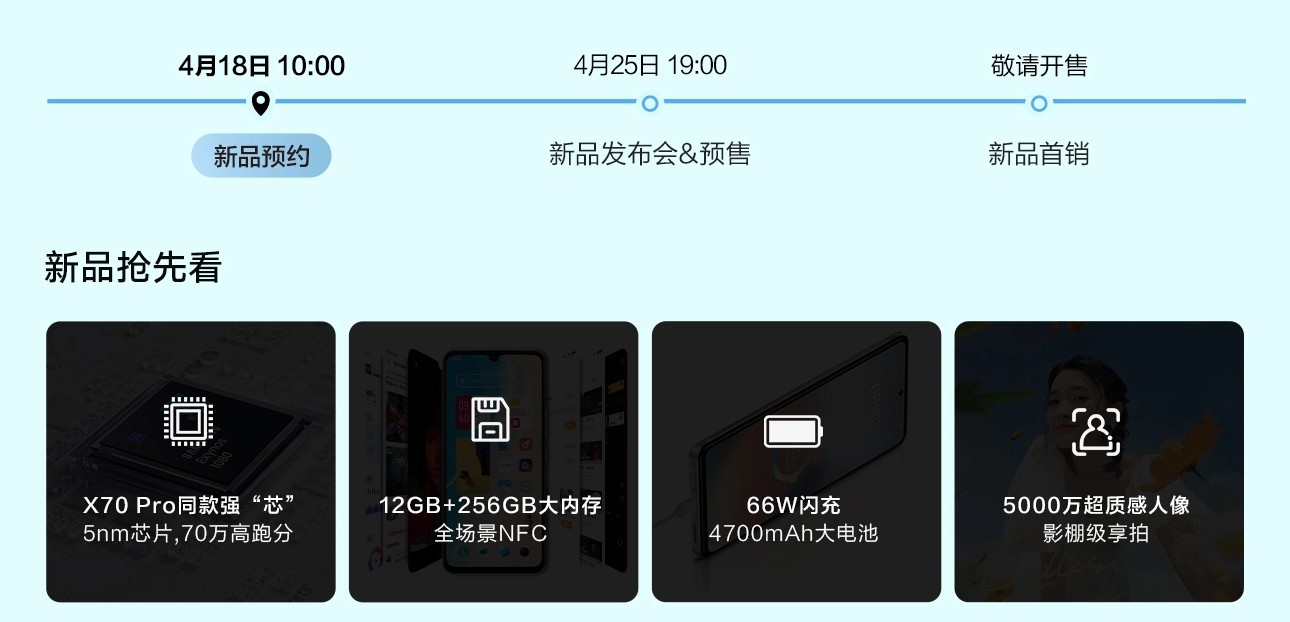
To nip rumors in the bud, vivo officially confirmed some details for the upcoming vivo S15e, while also setting a date for the full reveal. That will happen on April 25 (next Monday) at 7 pm Chinese time.
vivo S15e
The phone will have a 4,700 mAh battery and will support vivo’s 66W fast charging. This will be paired with an unnamed 5 nm chipset with up to 12 GB of RAM and 256 GB storage. Some leaksters speculate that this will use an Exynos 1080, just like some X70 and X60 models, but that part wasn’t confirmed.
The vivo S15e will also have a 50 MP selfie camera – just the one, so no ultra wide like on the S12 Pro, for example (that one had a 50+8 MP on the front in a wide notch).
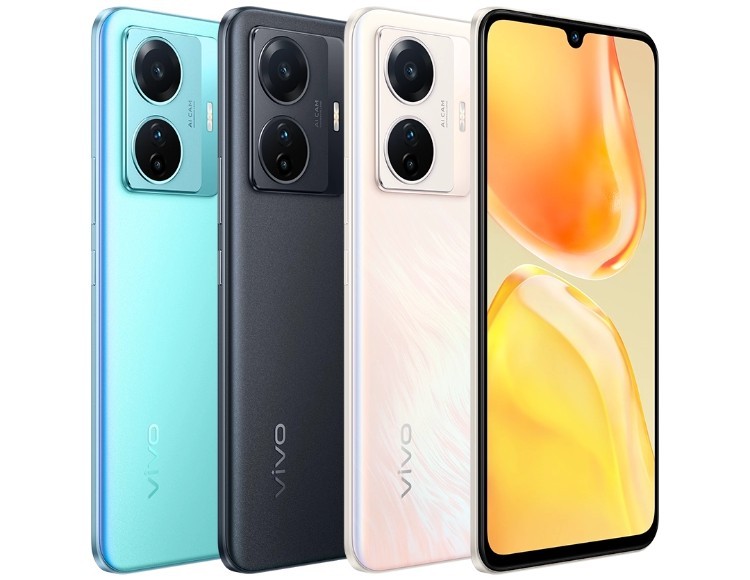
The company also shared images of the S15e, showing three colorways.
Pre-orders for the vivo S15e will begin on the 25th, sales will begin soon after that. In case you missed it, vivo has an even bigger reveal set for April 25 – the launch of the X80 series.
Super Mario Bros. vintage anime gets 4K remaster — here’s how to watch it
A new and comprehensive restoration of the 1986 Super Mario Bros. anime, scanned in 4K resolution from an original print of the film, is now available to stream on YouTube or download from the Internet Archive for your home viewing pleasure. While the film has been available to watch on YouTube for years, this new version of Super Mario Bros. – The Great Mission to Rescue Princess Peach is a clean, color-corrected, and newly subtitled remaster of Nintendo’s first foray into anime.
According to a description of the remaster from Femboy Films, the team behind the project, the scan of Super Mario Bros. – The Great Mission to Rescue Princess Peach comes from a “16mm reduction print likely used for small, local screenings back in the day” believed to be “one of the, if not THE only surviving print in the world.”
The new remaster features a brand-new audio recording using the VHS source. “The VHS was originally released with 2-channel Dolby Surround, which is preserved in the audio capture here,” Femboy Films says. “This reflects most accurately how the film would have sounded in cinemas, as it was released with 4-channel Dolby Stereo there.” New English-language subtitles, including translation of the anime’s music, is also available.
You may download the anime in many formats from the Internet Archive ..
Super Mario Bros. The Great Mission to Rescue Princess Peach a comedy-adventure film from 1986 which follows the events in Super Mario Bros . somewhat loosely. After Princess Peach escapes from Mario’s game world and enters Mario’s, King Koopa (aka Bowser), pursues her and force her to go back to the Mushroom Kingdom. Mario and Luigi are grocery-store workers. A Dumpling Dog lures them to the Mushroom Kingdom in order to save the princess. Wacky misadventures ensue.
The anime has a lot of strangeness that Nintendo wouldn’t recognize as canon. This includes ol’ Dumpling Dog and Prince Haru from the Flower Kingdom. There are also Goombas with arms and Luigi sipping sake. Super Mario Bros.-The Great Mission to Save Princess Peach is a great movie.
Final Fantasy 14’s broken housing lottery will get fixed soon
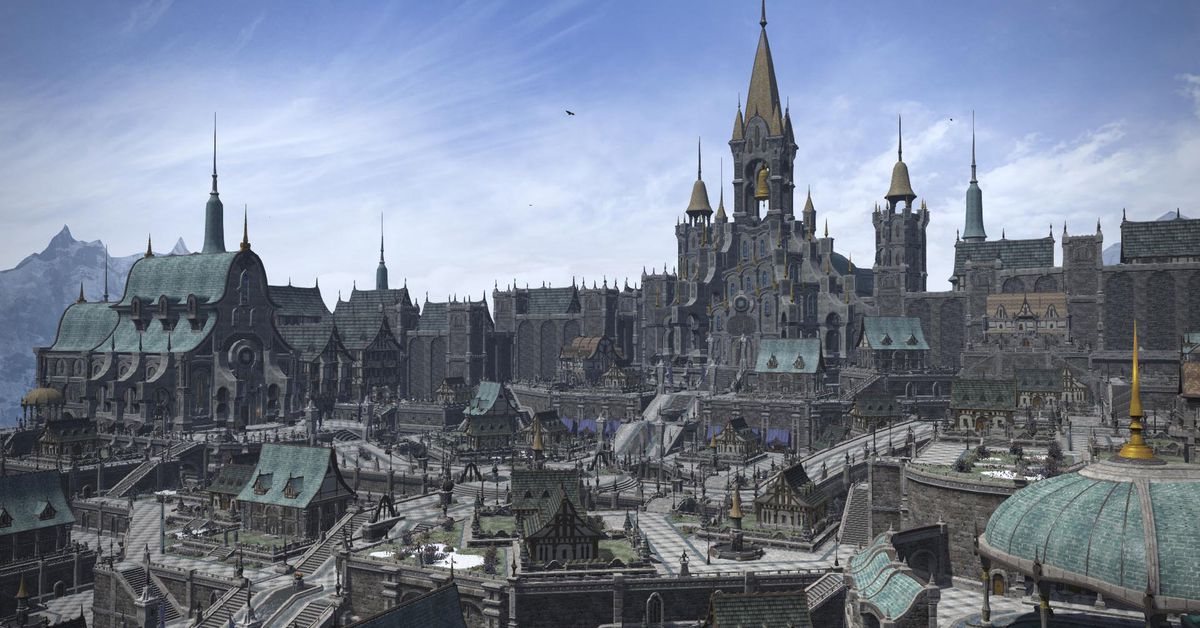
Final Fantasy 14 developers say they’ve figured out what was glitching the MMO’s housing lottery and will be correcting the problem shortly. Producer and director Naoki Yashida said that the lottery results from the previous week are preserved and could be used during server maintenance.
Players who win a plot of housing in a lottery with no bugs or other problems will not be required to restart the process or join another lottery. Yoshida requested that anyone with a housing parcel was able to claim it immediately to speed up the process.
The glitch entered the game on April 12 with patch 6. 1, which changed the way housing plots are awarded in the game. Before, everything was first-come/first-served, requiring players to sit through some ungodly waiting times before trying to buy a house. Over a period of nine days, the lottery will randomly award plots to winners. Players have five days to put in for an empty plot; a drawing is held and the winner, chosen at random, has four days to claim the plot.
Instead, users reported the lottery spit out “winners” with the number 0 (supposedly impossible under the system) or did not award the plot to anyone. In other examples, a single player entered the lottery for a plot, and yet was told there was no winner.
Yoshida on Saturday acknowledged the problems and apologized for the frustration they’ve caused. He also explained in greater detail how the lottery works, or is supposed to. Although the housing lottery uses a simple randomization system, players can have more than one character on their account. This means that the game has to set complex conditions so they are eligible for the draw. It took all weekend for developers to untangle what the lottery administration was seeing that caused the bugged outcomes.
Meantime: The “results announcement period” for the first lotto, which was originally scheduled to close on Wednesday, has been extended to an unknown time. Further, the developers aren’t holding any new lotteries until the problems with the first one is fixed.
Getting a house in Final Fantasy 14 “has always been an awful experience,” says Polygon’s official guide. As the Empyreum housing zone has been opened in-game, this means that housing lottery rules have changed. The guide has more details on how the process is supposed to work.
In 2020, Square Enix added 720 plots per server to keep up with demand, effectively doubling a housing supply that had already been expanded the year before. The game issued a moratorium against in-world demolitions and evictions during the peak of the pandemic.
Electronic Arts and DICE continue to make big improvements to Battlefield 2042, which was released in a poor state in the second half of 2021. With the game’s new 4.0 update, the publisher and developer will finally add in-game voice chat for both squads and party, as well as a handful of other features.
Here’s a look at the major additions to Battlefield 2042 in update 4.0, which goes live at 3 a.m. EST in the early morning of April 19. The game’s next major update is slated for sometime in May, and DICE promises further quality of life improvements.
VoIP (Voice over Internet Protocol) is by far the biggest upgrade in this patch. However, there is no voice chat for entire teams (which is arguably a good thing, given the game’s large team sizes) and instead restricted to either player’s pre-existing party or their in-match squad. Players can choose which of the two options the VoIP defaults to in the game’s menu.
The second biggest change in the patch is to the weapon-attachment system. DICE rebalanced the game’s various attachments to help differentiate them from one another. This manifests in a few ways, but most attachments give bigger buffs than before while also bringing drawbacks, in order to cement a better identity. You can see a full list of the changes below.
The scoreboard, which DICE added in March, will now appear in the end-of-round screen.
Those are the three major changes DICE called out in its patch notes, but the update includes a long list of other changes. There are bug fixes, balance improvements for a variety of specialists, matchmaking changes, and more.
General
Made several improvements to Kill Assists
Damage Assists trigger from a lower damage threshold, improving consistency and clarity
EMP Grenades now trigger Assists more reliably
Assists can now trigger when a teammate kills an enemy and either of them were covered in smoke you deployed.
Fixed EMP effects persisting on screen
Fixed a bug where equipping a weapon attachment from the item reveal menu would in some scenarios reset the full customization on that weapon back to defaults
Fixed a bug where the player’s saved customization would sometimes be reset to defaults after joining a server
Simplified keybinds for Chat and VoIP
Switch weapon for Gunner can now be properly bound in key bindings
Airplane and Helicopter sensitivity settings added to the Options menu
Matchmaking & Social
Fixed a matchmaking error that could occur after quitting a Hazard Zone server
Matchmaking information is now visible in the Player Card screen
Fixed a bug where a user encounters a matchmaking loop and gets sent back to the lobby.
Disbanding a party before joining it no longer incorrectly shows the “Remove EA Friend” prompt
Progression and Unlocks
Adjusted Ribbons to make them easier to unlock across all modes, especially in Rush
Further adjustments to specific Ribbons:
Logistics – Progress earned from repairing friendly vehicles has been increased, and progress earned from healing and resupplying has been reduced
Objective – Kills or Assists while fighting for objectives in Breakthrough now also give progress
Intel – Progress for hitting enemy vehicles with EMP’s has been doubled
Combat – Destroying an enemy Ranger now rewards Ribbon progress
Combat & Wingman – Kills and Assists on enemy Players in Hazard Zone now give increased progress
Mastery for the Mi-240 Super Hind, MV-38 Condor, and MAV now gets progress as intended when teammates spawn in on your vehicle
Cosmetics and weapon attachments are now correctly marked as New when unlocked
XP from support actions has been increased, while XP from objective actions has been decreased to compensate:
Projectile Destroyed, with Irish’ APS-36 Shootdown Sentinel, from 5 -> 10 XP
Enemy Disrupted with EMP, from 10 -> 20 XP
Equipment Destroyed, from 5 -> 10 XP
Healing, from 5 -> 20 XP
Resupply, from 5 -> 20 XP
Repairing, from 5 -> 20 XP
Ranger Destroyed, from 25 -> 75 XP
Objective Neutralized, from 250 -> 200 XP
Objective Captured, form 375 -> 200 XP
Sector/Objective Defended, from 15 -> 10 XP.
Added an XP event for killing a downed enemy in Hazard Zone
Repairing Ranger now correctly triggers the repairing XP event
Maps
Breakaway
Fixed players or AI Soldiers sometimes not spawning in the correct HQ area
Hourglass
Fixes a bug where players were still receiving damage from the Tornado while inside the Stadium
Kaleidoscope
Sprinklers are now active for 9, instead of 20 seconds
Sprinklers no longer deal damage
Sprinklers should no longer affect players outside the building
The freeze effect in the HUD is less intense
Fixed an issue where players could shoot through the tires of some trucks on Kaleidoscope
Orbital
Fire from the rocket explosion event is no longer invisible and will slowly dissipate
Renewal
Fixed a bug where soldiers and vehicles would be affected by the storm while inside buildings
Reduced rubberbanding when key events such as the rocket launch get triggered
Bollards and ramps should no longer be triggered by deployed gadgets
Toxic barrels now continue dealing area damage if another nearby barrel gets destroyed shortly after
Fixed a bug/exploit where players were able to deploy gadgets or shields that would intersect with MCOMs, not allowing them to be disarmed
Fixed a bug where container doors were still presenting the interaction prompt after being destroyed
Updated destruction behavior for fences
Minor prop objects at distance now pop more slowly
Added support for traversal on objects linked to moving platforms
Enabled cover occlusion for player damage from explosions
Fixed a bug when elevator doors weren’t synced for players joining later during a match
Players can now sneak and open doors close to them while ADS
We’ve resolved multiple smaller issues across all maps that could negatively impact gameplay: Fixed some areas where players could get stuck
Fixed floating of items
Fixed some collision areas that caused players to fall through items/the map
Fixed areas where planes could go through terrain while out of bounds
Fixed being unable to interact with some objects
Fixed some areas where players were able to see through the map
Fixed behavior on some interactable objects such as doors
Fixed clipping of objects such as vegetation
Battlefield Portal
Made several improvements to the Portal Browser
Name/Description is now autofilled when creating an Experience
Name/Description fields of preset Experiences are now empty by default
Browsing Experiences remembers your previous search query
Resolved instances where the Browse tabs didn’t function correctly when applying custom filters
Made adjustments to the chase camera on a number of vehicles in Battlefield Portal
Fixed an issue which could cause a game crash when players were near a Kübelwagen
Players no longer remain in a stuck trigger animation after deploying C4 and immediately jumping into a vehicle
The Defibrillator can no longer be equipped while swimming
Stationary Machine Guns will now be destroyed alongside accompanying towers
Added new VO lines for destroying or capturing objectives
Added new VO line for tower collapse event on Caspian Border
The tower on Caspian Border will now have improved barrage & projectile VFX before its collapse
Players can now switch back to their secondary weapon on an Experience with all primary weapons disabled
The Cycle Primary Weapon key binding now properly cycles to the secondary weapon if the player doesn’t have a primary one
You should now always automatically have your last played loadout in the next round
Spawns on El-Alamein have been moved to prevent becoming stuck after deploying in FFA Mode
Battle of the Bulge – the screen now changes to sepia when going out of bounds near the tank battle vista area
Numerous fixes for floating rocks and cliff faces in Valparaiso, Arica Harbor, El-Alamein, and Caspian Border
Bad Company 2
You can now switch back to the Mortar Strike gadget while it’s recharging
You can now switch out from the Mortar Strike gadget using the inventory prev/next bindings (default mouse wheel) while it is recharging
Fixed an issue where weapon under barrel attachments would trigger on button press even if the weapon was not selected at the time
Rush – updated M-Com screens with arming/disarming progress bars and countdown timer
Audio
Fixed the wrong VO playing when giving attacking orders as Dozer
Fixed issue where Falck’s gadget VO would trigger when hitting enemies
The healing sound will now always play when Falck heals herself with the S21 Syrette Pistol
Adjusted Wingsuit audio for Sundance so they are easier to hear for enemies
Added surface scrape sounds to vehicle with tracks when rotating stationary
Improved audio across amphibious vehicles
The MD540 Nightbird and AH-64GX Apache Warchief now have the correct audio cues when Air-to-Ground missiles are ready to be used
Destroying a gadget should no longer trigger vehicle destroyed voice over
Improved at range audio for the Recon Drone
Low health sound should no longer get stuck when going into a vehicle
Added audio VFX for turning on/off the Flashlight attachment
The Prox Sensor should no longer emit warning sounds if no enemies are within reach
Soldiers should no longer hear the opposite ping VO being triggered from a 3P view
Improved audio consistency for vehicle call-ins
Improving cockpit audio experience when driving enclosed Land Vehicles in first person
Tweaked the vaulting sound when climbing ladders
Added audio for birds on Renewal
Added audio for destroying screens in the Synseco laboratory lobby in Renewal
Improved audio for damage caused by storms
Improved audio for vehicle gear shifting
Fixed an issue where rapidly pressing fire on a Sniper Rifle would play an audio cue as if two shots were fired
Improved audio for the M5C Bolte, EBAA Wildcat and MD540 Nightbird when they pass by players
Modes
Breakthrough
Fixed air vehicles being able to spawn at the opponents HQ in start of the round
Hazard Zone
Successful missions should no longer be shown as failed
You can no longer use a Redeploy Call-in when all players in a squad are alive
Removed placement ranking stats from End of Round screen in Hazard Zone
Adjusted costs of several Hazard Zone weapons and gadgets
The roaming AI LATV’s should no longer fail to spawn, or spawn at the wrong times
Soldiers should no longer be stuck in a mandown state
Hazard Zone end of round now shows all kills, instead of just human player kills
Hazard Zone end of round now properly shows in round instead of lifetime respawns
A collected Data Drive will no longer be permanently marked on the minimap
Players can no longer move their character in Hazard Zone after dying or bleeding out
Rush
Fixed issues with Rush declaring the winning team prematurely and/or incorrectly
Deploying gadgets over Rush M-COMS should no longer prevent arming it
Conquest
Adjusted spawn locations to prevent spawning out of bounds
AI Soldiers
AI Soldiers will no longer appear lagging while entering a vehicle
AI Soldiers can now repair combat vehicles in All-Out Warfare
Improvements to AI Soldiers operating Helicopters
Improvements to AI Soldiers reviving human players
Soldier
Fixed some issues where the player would be impossible to hit when entering an exposed vehicle seat
Fixed an issue where dead soldiers or friendly soldiers would block bullets
Fixed further instances of not being able to revive players when some of their body parts were clipping with assets/geometry
Fixed players not being able to place deployables in certain areas
Fixed an issue where the player would not be able to jump or vault after reviving someone
Fixed an issue where players would have 2 hands on a rifle while sprinting on a steep slope
Fixed losing input when jumping on/off the ladders
Fixed players appearing to fly after meleeing water
Fixed soldiers sometimes becoming invisible while downed
Fixed players sometimes going into downed state, instead of dying if killed in an out of bounds area
Fixed players entering a downed state after crashing with an air vehicle
Fixed players sometimes entering a downed state state while under water
Fixed players sometimes being thrown up in the air after getting revived
Fixed an issue where redeploying your soldier could cause dropped weapons to float
Fixed an issue where it wouldn’t be possible to crawl under certain obstacles while prone
Fixed an issue where the player’s camera could sometimes clip through the ground or objects when prone
Fixed an issue where the soldiers could fly when dropping down from steep areas
Fixed an issue where certain camera transitions would force the player’s FOV to be reset to the default FOV (55°)
Fixed an issue where it is possible to die when entering a vehicle right after performing a melee attack while in the air
FOV should no longer break after switching weapons on ladders
Improved traversal across moving objects
Updated animations for directional vaults
Soldiers will no longer die when swimming close to or under a water vehicle
Animations
Fixed an issue which would cause broken weapon animations while sprinting into world objects such as a wall
Fixed an issue where reload animations would play incorrectly
Fixed an issue where aborting a revive caused first person animations to break
Resolved several corrupted eye animations
Improved the preview animations of deployable objects
Improved left arm animations while crawling with a MCS-880
Improved left hand animations when using an under barrel attachment while sprinting
Sprinting out of water while swimming no longer puts you in a stuck sliding animation
Left hand animations should no longer break when entering and exiting vehicles
Players should no longer experience looping revive animations when downed
Gunners should no longer sometimes clip behind vehicles while driving
Made revive animations smoother
Switching weapons in a vehicle open seat will no longer result in a broken animation
Toned down weapon movement during initial ADS after deploy
Smoothed out the transition animations for camera and weapon movement when switching between stand/crouch
Jumping into water while reloading will no longer cause a broken reload animation
You can no longer see through your hands while using the SWS-10 or DXR-1 in prone position during reload
Polished idle animations for rifles
Specialists
Angel
Fixed a bug where Angel’s Supply Bag won’t land when bouncing close to a vehicle
Fixed instances where Angel’s Supply Bag didn’t activate correctly
Fixed some occurrences that could cause the mesh of Angel’s Supply Bag to copy itself onto other thrown projectiles
Irish
Made all vehicle types able to smash through Irish’s Deployable Cover
Resolved instances where Irish’s Fortification System couldn’t be placed on angled terrain
Fixed a bug where the APS-36 Shootdown Sentinel would not always stop targets if blocked by a soldier standing on it
Fixed an issue where players could see the APS-36 Shootdown Sentinel in an infinite firing loop at an unidentified target
Dozer
The SOB-8 Ballistic Shield and main weapon can no longer equipped at the same time when bashing or entering a vehicle
Dozer now becomes vulnerable for a short time when the SOB-8 Ballistic Shield is hit by heavy fire such as from tanks
Dying as Dozer while holding the SOB-8 Ballistic Shield will no longer cause you to be resurrected with the shield active
Reviving Dozer with the SOB-8 Ballistic Shield active no longer makes you float upwards
Repeatedly pressing the Prone and SOB-8 Ballistic Shield buttons as Dozer will no longer result in the player having the shield up while prone
Performing a takedown on Dozer with an active SOB-8 Ballistic Shield will now play the correct animation
Fixed a bug where Repair Tools caused the SOB-8 Ballistic Shield to deflect bullets
Fixed an issue where the SOB-8 Ballistic Shield could bash through thin walls
Rao
Rao’s Cyber Warfare Suite should now feel more responsive
Resolved bugs related to using the Cyber Warfare Suite ability without an active target
Once the Cyber Warfare Suite ability finishes, your target is now reset
Replaced Trojan Network with the Thread Perception Trait:
When Rao takes damage from enemy fire, he will automatically spot the enemy for himself
Paik
Replaced Threat Perception with the Eagle Eyed Trait:
Players damaged by Paik are now spotted for everyone
Updated Paik’s Mastery criteria to align with her new Trait
Casper
The OV-P Recon Drone can now be descend with Crouch toggle buttons
The rotors on the OV-P Recon Drone are now placed correctly
The spotting sound now plays correctly while using the OV-P Recon Drone
The OV-P Recon Drone now remembers it’s direction upon re-entry
Resolved wrong text displaying when OV-P Recon Drone
Fixed an issue that would sometimes prevent you from flying the OV-P Recon Drone upwards if you entered it while crouching
Boris
The SG-36 Sentry Gun should no longer clip outside elevators
A tank running over the SG-36 Sentry Gun will now destroy it
Sundance
Fixed Anti-Armor Grenades that locked on to targets which were too far away
Anti-Armor Grenades now filter by angle and distance in a more accurate way, and have the same priority for air/ground vehicles
Anti-Armor Grenades no longer swap targets when already tracking a target and have reduced maximum range once unfolded and in flight
Anti-Armor Grenades now have different tracking radius for ground and air vehicles
Anti-Armor Grenades no longer target Irish’s Deployable Cover or APS-36 Shootdown Sentry
Anti-Armor Grenades track properly if left sleeping on the ground now, instead of simply exploding
Improved the speed when switching through Sundance’s Grenade Belt
Scatter Grenade detonation timings adjusted to let them explode quicker
Landing on rough terrain no longer causes Sundance to bounce up in the air
Fixed a rare issue where Sundance’s body could become detached from a vehicle upon entry while landing onto the vehicle from the wingsuit, causing Sundance to become invisible
Falck
Falck’s S21 Syrette Pistol can now be equipped while swimming
Fixed an issue in prologue where Falcks syringe did not spawn a pickup on the ground
Reduced the distance at which the S21 Syrette Pistol’s dart is visible
Mackay
Made it easier for Mackay to grapple onto moving vehicles
Players can no longer take damage from the Grappling Hook while downed
Adjusted Mackay’s walk animation when aiming down sight, the sight should no longer misalign with where shots are fired
Resolved issues where smoke stopped the Grappling Hook from working
The Grappling Hook crosshair should now correctly pick up objects while in range
Looking as far left/right you can while grappling while pressing A/D no longer allows you to slow down or speed up
Fixed a rare occurrence where entering a vehicle after using the Grappling Hook could cause Mackay to become invisible
HUD / UI
HUD – hints for Reload, Low ammo and No ammo will now blink a few seconds and then fade out. Switching weapons in these states will restart this animation
HUD – added critical (red) and out of bounds (gray) color to WorldInfo, SoldierInfo and SoldierCompass HUD widgets
HUD – centered soldier compass direction readout and added positioning arrow shape
HUD – added scaling options for the Mini-map/team, Personal Log, World Log, Player/Vehicle Info, Chat and Vehicle Passenger List
HUD – added critical state for vehicles
Added new options that allow players to scale the transparency of many different icons in the HUD (Friendly icons, Squad member icons, Enemy Icons, Revive Icons, Objective Icons and Ping Marker Icons). Each icon type can have a different transparency when zoomed or not zoomed. The option can be found under DISPLAY > HUD ICONS.
Added a Chat Log Visibility option to allow players to set the default visibility mode of the chat log (which allows it to be turned OFF on console where no key bindings exists to change visibility in-game)
Adjusted scaling of objective icons over distance, they will now start scaling at 50m (instead of 100m) and stop scaling at 500m instead (instead of 1000m)
Solved an issue where friendly icons were too enlarged
The “Need Healing” icon is no longer visible over friendlies while playing as Angel without a Medical Crate
The grenade indicator no longer remains after the grenade has already exploded
The killcard should now always update after being killed by AI Soldiers shortly after self healing
SG-36 Sentry Gun and OV-P Recon Drone are now shown/hidden depending on gadget availability
Fixed a bug where the minimap didn’t update when entering an air vehicle from the ground
Fixed a problem that caused hints to disappear on initial deploy into vehicles
Made animations for the Plus Menu smoother
Added 24 new options to control the opacity and size of HUD icons
Added missing Always Traversal Sprint option under CONTROLLER tab
Gadgets
Fixed an issue that prevented equipping of the IBA Armor Plate if you were being healed at the same time
Using the IBA Armor Plate no longer causes the plate to flicker and reappear on screen after use
Fixed a bug where players were able to deploy items to clip ladders and ziplines which could block passage
Improved the positioning of the preview of deployed objects (such as Boris’s turret) to better reflect the surface the player is trying to place it on, instead of hovering in the air.
Gadgets should no longer be destroyed if a door opens or closes close to them
Fixed an issue where gadgets resupplied via the Loadout Crate caused the player to not be able to redeploy their chosen gadget later on during that life
EMP effect from grenades no longer extend past their visual explosion radius
Fixed an issue that allowed players to drop Ammo and Medical Crates through thin walls
CG Recoilless M5 / RPG / SMAW will now one shot Ranger if it’s a direct hit
The CG Recoilless M5 will no longer automatically reload while you are downed if you died after firing it
Fixed an issue causing empty reloads on the Recoilless M5 to be interrupted when vaulting
Fix for issue where users were able to detonate the C5 Explosive while being hacked
Fixed an issue where both soldier Anti-Tank Mine & the Bolte’s Anti-Tank Mine would despawn after a short while if the player died
The Repair Tool now turns off when a player dies
Made it easier to place the Insertion Beacon
You’ll now spawn in the same direction where the Insertion Beacons is facing when spawning on it
Fixed an issue that would allow players to shoot FXM-33 AA missiles while their target was in smoke
Fixed an issue where FXM-33 AA Missile did not become enabled again until the user switched to another weapon and back again after being affected by EMP
Fixing a issue where Smoke Grenades did not explode on moving cranes
Weapon Attachments
The behavior of many weapon attachments has been overhauled to ensure that their impact when customizing your weapons is unique, and noticeable. Previously, some attachments had effects that were too similar from others, and it was unclear what the impact on your weapons would be when switching between them. Here’s an example of updated behavior while customizing the AC-42:
Update 3.3: improved accuracy while moving, reduced accuracy while static
Update 4.0: :increased hipfire accuracy, reduced accuracy while ADS
C – Maul Hybrid 1.5X-3X
ADS speed decreased in 4.0
Zoom levels and Optics toggle options persist
D – Subsonic Rounds
Base recoil reduced in 4.0
Reduced Muzzle Flash visibility
Decreased projectile velocity
Further changes to Weapon Attachments:
Factory and Extended Barrel descriptions now display the correct fire rate changes
Weapon modifiers are now correctly applied when swapping attachments while the bipod is equipped
Fixed an issue that would cause the 40mm Grenade Launcher attachment to hit an invisible wall when fired indoors
Fixed an issue which would grant unlimited ammo if magazine attachments were toggled in between firing the underbarrel attachment
Fixed some weapons displaying wrong ammo counts for specific magazines
Adding and removing attachments in the Plus Menu will now always correctly apply their statistic changes
Underbarrel activations such as flashlights and laser sights will no longer be reset after getting revived
Bipod attachments will no longer toggle on and off while reloading
The ADS time on the BKS 8X now matches that of other scope attachments
Adjusted the size of the DD Holo scope to bring it in line with other scopes
Reduced blur on the Ghost Hybrid scope
Some underbarrel attachments should no longer have a shared ammo pool
The Maul Hybrid and the Ghost Hybrid now correctly displays both scope zoom levels in the Collection screen
The Fusion Holo attachment no longer clips through the meshes on the following weapons: AK-24, LCMG, PP-29 and the SFAR-M GL
Fixed clipping issues with the camera when the Fusion Holo optic is equipped while ADS
Weapons
The high powered magazine for the AK24 now shows the correct amount of bullets
Fixed an issue where players were unable to fire straight away after reloading the Grenade Launcher attachment on the M5A3
Updated text descriptions for both the NTW-50 and DM7
Fixed an issue which caused the extended magazine for the PBX-45 to have a slight delay before it fires after reload
Located a missing ‘R’ in the description of the PKP-BP
Increased PKP-BP Base Recoil
Fixed an issue that would cause weapon lag across scopes for the M44
The missing bullet on the M44 has been located
The M44 now displays the correct reload animation while in prone
Fixed an issue with the M44 that caused the scope to move a lot more than intended when aiming around
Arcom Tactical Muzzle Brake no longer floats when equipped onto the MP9
Increased the long range damage on SWS-10 light ammo from 35-40 over 75 meters
The Iron Sight will no longer be visible when the Fusion Holo is equipped to the PP-29
Fixed an issue with the incorrect ammo pools to be set on the PP-29, which would show incorrect ammo quantities
Fixed the PP-29 medium and subsonic ammunition having inverted ammo pools
Fixed an issue which could cause underabarrels on the SFAR-M GL to unexpectedly run out of ammo
Recentered the iron sight on the DXR-1
AC42 Bullet Damage dropoff increased
AC42 effective range has been lowered
Reduced scope shake when firing on the DM7 and VCAR
Fixed an issue where weapons would have inconsistent dispersion or recoil
Fixed an issue which prevented bullets from dealing the correct damage amount
Bolt Action Sniper rifles now correctly play their animation after opening the Plus Menu and firing
Reload prompt will no longer stop flashing when there are only a few bullets left in the magazine
Reloading while ADS will no longer reset the camera zoom
Fixed an issue which could cause weapons to become invisible while climbing a ladder
Fixed an issue which caused some players to be unable to shoot or ADS after exiting a vehicle
Toggle Scope is now affected by soldier controller schemes
Weapons in the collection screen will no longer compare to the weapon selected in deploy screen which caused incorrect comparisons
Improved the visual quality of the crosshairs and red dots within high powered scopes while on low/medium graphic settings
Removed some double spacing within text descriptions of multiple weapons
Reduced scope shake when firing on the DM7 and VCAR
Fixing broken arm when doing pump action while crawling with the MCS-880
Improved weapon animation when deploying from a vehicle
Added a game hint for steady scope
Weapons should no longer slide over the floor when dropped
Made improvements to the position and drop timing for dropped weapons
Underbarrel shotgun crosshair does not disappear after zooming
Melee
Animation fixes related to melee takedowns
Fixed an issue where the camera was misplaced during a takedown
Fix related to targets flying away when doing a takedown on a moving platform
Fix where melee hits didn’t register consistently on moving targets
Fixed a bug where the player could throw a grenade and melee at the same time
Fixed a bug where player could get stuck in melee animation
Fixed a bug where doing a melee attack in prone could make the knife stuck until another melee was initiated
Fixed an issue which would cause guns to instead play a knife animation
Vehicles
As outlined in our recent Core Feedback, we are adjusting the number of active vehicles across maps and modes, and you’ll notice the first iteration of this change within this update. As an example of how that plays out on Breakthrough 64 for Kaleidoscope, here is how we adjusted total available vehicles in the match, per Sector:
Sector 1 – 17 -> 13
Sector 2 – 18 -> 17
Sector 3 – 19 -> 17
Health for soldier and vehicle now show correct values for all seats in the vehicle
The radar will now appear correctly while redploying on a team/squad mate in the Mi-240 Super Hind or MV-38 Condor
Killing someone with a Tuk-Tuk would sometimes show the wrong vehicle icon the kill card
Destroying either the Tuk-Tuk or Polaris Sportsman in a tunnel will no longer cause floating debris to be present
Players can now ping while driving vehicles in 3rd person view
Fixed an issue that would cause reversing in a tank to be problematic
Fixed an issue that would allow players to skip the equipment cooldown timer while in a helicopter
Players will no longer find themselves in a floating state while exiting a fighter jet upside down
Fixed an issue which would cause vehicles to not be deployed when called-in, but still shown as ‘in-play’
Fixed an issue that would allow players to shoot AT missiles while their target was in smoke
Adjusted text on the vehicle zoom options in order to make it clearer what the option does
Tornados should no longer throw a helicopter under the world, resulting in passengers ending up under water
Fixed an issue that would sometimes affect the visibility of flares
Exiting and re-entering a tank will no longer result in a misaligned camera
Fixed an issue that could allow helicopters to fly under the game world on Hourglass
Fixed an issue that would cause the AA missile launch to skip the yellow lock on phase, jumping straight to red
Fixed an issue that could sometimes cause helicopters to spawn on the ground
Fixed an issue that would sometimes cause players to fall through the world when deploying into a tank
Fixed an issue that would allow players to manually reload weapons on certain vehicles
Air radar should now correctly display enemies
System repair would sometimes only replenish a few health points, this has been corrected
It was possible for players to hurt themselves with some explosive vehicle weapons during the vehicle enter animations, this has been disabled
It’s no longer possible to shoot yourself for a short period of time when entering a vehicle
Vehicle hints will now show up on initial deployment
Vehicle “invert look” settings are no longer connected to flight controls
Fixed an issue that would allow players to instant lock onto a vehicle after flares have been used
Lights on air vehicles are now turned on when a player is in the cockpit.
Fixed an issue which would occasionally see the AH-64GX Apache Warchief or KA-520 Super Hokum Smart rockets ignore their target.
A specific concrete block was causing the T28 to become stuck. The T28 has overcome its fear and can now traverse over it
Invert vertical look is now working as expected on transport vehicles
Vehicle 3rd person camera no longer clips through the environment.
The ‘Hints for Controls’ option now displays for all intended vehicles.
Fixed an issue that would cause the bridge to clip while in 3rd person view in a T28 on Hourglass
Backpacks can no longer be seen sticking out of the side of the B17 Bomber.
Taking a Tuk-Tuk into an elevator will now display the correct health
Made tweaks to various VFX while in a helicopter and firing counter measures to reduce photosensitivity risks
Vehicles spawned through Deploy Screen will now be eventually abandoned if they are left
Fixed an issue which would cause animation issues when going from vehicle to downed state
Helicopter lights are no longer offset from their initial position while in the matchmaking countdown screen
Deploy animation will now only play once after the player has switched seats multiple times in a row within vehicles.
Tanks should no longer get stuck in the mud while in a storm on Orbital
Weathering effects are now applied more consistently to vehicles.
The soldiers physics representation now better matches the the actual animation pose when in a Tuk-Tuk or a Portal RHIB
Added a freelook 3rd person view crosshair to vehicles
Vehicle hud while in 1st person view now turns red when in a critical health state
Vehicles now show both soldier and vehicle health for all seats occupied by the player.
Updated the “Transport Look Behind” option to “Reset Camera View”
Tweaked camera pitch while in 1st person view within a helicopter to better reflect the direction of travel and increase visibility
Fixed spawning of vehicles in elevators
Vehicles should no longer incorrectly be slowed down when driving over certain platforms like bridges
AH-64GX Apache Warchief
The wing camera when firing rockets on the AH-64GX Apache Warchief is now more accurately aligned
The HUD will now be more visible when performing a nose dive in the AH-64GX Apache Warchief
EBAA Wildcat
Fixed text description on the EBAA Wildcat to more accurately reflects its weaponry
Fixed text description on the EBAA Wildcat and T28’s Smoke Launcher
The EBAA Wildcat can now climb hills with a bit more ease
Increased the handbrake strength on the EBAA Wildcat
While on Orbital the The EBAA Wildcat used to have trouble driving over low to average height rocks. This no longer occurs
F-35E Panther
The F35-E Panther will now take the intended damage when hitting specific buildings on Hourglass
Increased ejection force when at low speeds in the F-35E Panther
Added an ejector seat for the F-35E Panther when in Hover Mode
Afterburner VFX is no longer visible through the engine swivel nozzle in a F-35E Panther
KA-520 Super Hokum
Made tweaks to the KA-520 Super Hokum to better align its bullets to the crosshair
The KA-520 Super Hokum now correctly displays equipped attachments on its 3D model
LATV4 Recon
While entering a LATV4 Recon after sprinting, players will now find themselves in the correct seat
Fixed an issue that would cause the LATV4 to sometimes fall through the floor on Hourglass
Better positioned the hitbox of the the gunners head and shoulders when in a LATV4 Recon
Player is no longer pushed out of bounds if revived under the LATV4
The LATV4 Recon will no longer get stuck on a problematic rock on Discarded
LCAA Hovercraft
Fixed an issue that would cause the LCAA Hovercraft to become stuck on the environment on Breakaway
LCAA Hovercraft collision around point G1 on Kaleidoscope has been fixed
The LCAA Hovercraft can no longer fly after hitting a ramp at high speeds
Tweaked the boost on the LCAA Hovercraft to avoid it going up vertical walls
Swimming close to a LCAA Hovercraft that is on water will no longer result in death
M5C Bolte
Players are now able to shoot passengers within a M5C Bolte more easily
Fixed an issue that would cause the MC5 Bolte to fall through the world on Orbital after clipping tree trunks.
Fixed an issue that would cause the camera to break when revived from under a LATV4 Recon.
Fixed an issue that would prevent the MC5 Bolte from being visible after a call-in is requested
Fixed issue where the animation of the M5C Bolte’s main gun could become stuck in the firing animation.
MC5 Bolte Missile Launcher has been adjusted, and now also damage tanks
Time to live 10 -> 3.2
Engine strength 175 -> 70
Damage 70 -> 45
MAV
Fixed an issue that caused the 40mm Volley Pod crosshair to not show up in the MAV
Improved text descriptions on the MAV
MD540 Nightbird
Switching seats in the MD540 Nightbird would sometimes alter the FOV. It should no longer do this
It’s now possible to shoot the pilot of an MD540 Nightbird through the upper part of the cockpit’s glass
MV-38 Condor
The MV-38 Condor should no longer spin out of control when it gets destroyed
Fixed text description on the MV-38 Condor to more accurately reflects its weaponry
Fixed an issue where the camera positioning could sometimes become stuck after exiting a MV-38 Condor
50mm Cannon Pod has been tweaked against other vehicles
RWS 50mm mounted on Air vehicles
Start and End Damage 60 -> 65
ImpactImpulse 8000 -> 3000
This change means it should now destroy the MD540 Nightbird in 2, instead of 3 shots
RWS 50mm mounted on Land vehicles
ImpactImpulse 4000 -> 2500
StartDamage 85 -> 92
EndDamage 60 -> 65
Damage FalloffDistance start 180 -> 200
Replenish Rate 2.3 -> 2.1
Polaris Sportsman
Players should no longer fall through the game world while driving the Polaris Sportsman on Renewal
Made adjustments to the camera setup while driving the Polaris Sportsman, ensuring players retain visibility at all times
Players can no longer get stuck in cargo containers while driving the Polaris Sportsman on Breakaway in Hazard Zone
T28 / M1A5
HEAT Shell
Impact damage increased by 90 > 115
Replenish time per shell increased from 6 > 6,8 seconds
Samsung quietly launched the Galaxy M53 smartphone, and now it is time for the device to reach store shelves. The first major market confirmed for the mid-range phone in India – it will arrive on April 22.
The Galaxy M53 borrowed some specs from its mightier sibling Galaxy A73, including the 6. 7″ Super AMOLED+ screen with a 120 Hz refresh rate and a 5,000 mAh battery. There is also a 108 MP main camera and a 32 MP selfie shooter, but aside from that, the specs are pretty basic.
The quad-cam setup on the back is completed by an 8 MP ultra-wide-angle camera and two 2 MP shooters for macro and portrait photos. The chipset is allegedly Dimensity 900 with two Cortex-A78 cores at 2. 4 GHz, and memory is 6 GB RAM + 128 GB storage.
Getting a house has always been an awful experience in FFXIV, though with the addition of the new Empyreum housing area in Ishgard, the developers added a couple of changes to the housing system. Our FF14 housing guide explains how to sign up for housing lotteries and hopefully get a house in the new area.
Update (April 18): We’ve updated this guide with information caused by the recent housing issues.
What is different with FFXIV housing?
Before patch 6. 1, all new housing areas were first-come first-served. All housing plots previously occupied by someone else had to be vacated and waited for the invisible timer expire before they could be purchased. This means you would have to sit at a lot for a random amount of time (which could take over 20 hours, if you were unlucky) clicking a placard to try to buy the house.
According to Square Enix, “At the release of Patch 6. 1, all land available for purchase will be subject to the lottery system.” In the future, some wards may still use the first-come, first-served (old) system, but for now, everything will be using a lottery.
How does the lottery system work?
Each character can select one house to join the lottery for. Houses will take lottery entries for five days. After that, a winner will be picked, and the winner will have four days to claim the plot. If it goes unclaimed, a new lottery will begin for that plot.
To enter the lottery, click the placard in front of the empty plot you want to sign up for. You need to pay the full price of the housing plot up front, but it will be returned to you if you don’t get the land. To get your refund, you will need to return to the original placard.
If you win the lottery but do not claim the plot after winning, you’ll lose 50% of the deposited gil.
How do I get a house for myself?
Head to the Empyreum housing ward in Ishgard with the amount of gil your desired house size costs. (Smalls cost 3-4 million gil, mediums cost 16-20 million, and larges cost 40-50 million.) You can click the placard to select the lot that you are interested in, then deposit the gil and ask for good luck.
To qualify for a home, the following :
must be met.
At least one class must to be level 50 or higher
Grand Company rank second lieutenant or higher
How do I get a house for my Free Company?
To get a house for a Free Company, it’s pretty much the same thing. To sign up for the lottery click the placard located at the lot you wish to enter. However, only one house can be entered at once so sign up now for your personal home.
Any member of a Free Company may sign up to the lottery, provided they fulfill the eligibility requirements. This means your FC can have several entries on one lot if your FC mates all apply for the same lot.
To be eligible for the Free Company Housing Lottery, the following :
must be completed.
Your Free Company must be at least rank 6.
Your FC has to have at least 4 members.
You need permission from your FC in order to purchase land.
You need to be in the FC for at least 30 days.
What about housing outside of Ishgard?
Many players with homes elsewhere will be able to enter the Empyrium housing lotteries for better places or larger houses. This means lots of vacant plots will become available after the initial lottery ends.
Square Enix has confirmed to us via email that all plots will use the lottery system in patch 6. 1 until further announced, even if they open via relocation.
A new lottery will be held after the nine-day period has ended. All lotteries are now suspended until Square Enix can resolve the housing lottery problem.
What big problem happened during the first lottery?
A lot of houses were able successfully use the lottery system which led to purchase plots. A lot of the houses also claimed that 0, the number which won the lottery, was the winner. This was a number that was not assigned to anyone. It means there were many plots that failed to work and no one was able win the lottery, even though they had the sole entry.
According to Square Enix, the lottery worked as intended, but the results were not displayed properly. Square Enix still has the lottery data and will draw numbers again from the first lottery pool. There are some issues they need to sort out before they do this, though, such as how to reenter people who already reclaimed their gil from the placards.
Once the developers do figure this out, there will be a maintenance for all the servers, which restores the lottery data and (hopefully) gets players the houses they deserve. This guide will be updated as soon as the maintenance announcement is made.
Elden Ring’s Let Me Solo Her becomes an in-game summon
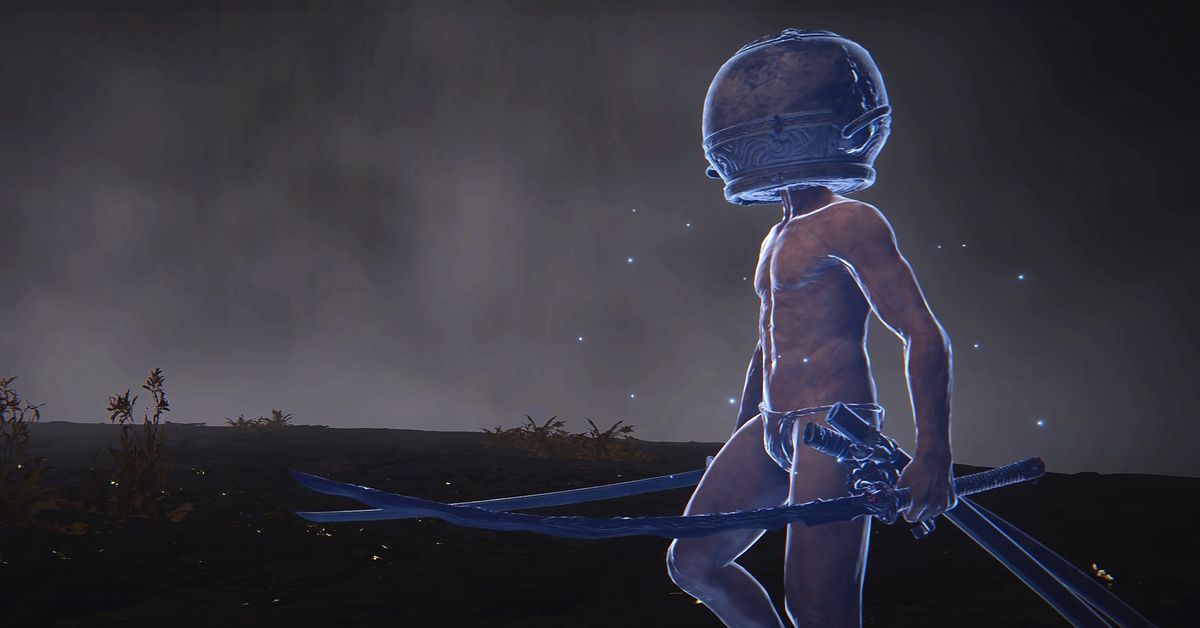
Elden Ring makes it a difficult game, but there are many helpful summons that make the task easier. You can summon an NPC to summon the soul of an enemy or you can summon someone online who will help you. A man named Let Me Solo Her was famous for his ability to help players beat the hardest boss in the game. He had two swords and a pot on the head. Thanks to Elden Ring ‘s mod community, he has been elevated from a real-life human to a NPC summon.
The problem with online summons in Elden Ring is that it’s like the playing the lottery with your time. You could summon Malenia, the boss Let Me Solo Her who is notorious for his brutality — but you might not get your potheaded hero. Or, and more likely, you’ll get someone far less impressive. While real-life summons have a higher ceiling, NPC summons tend to be more reliable.
What’s better than getting lucky and summoning Let Me Solo Her? Summoning Let Me Solo Her whenever you want. That’s now a reality thanks to Garden of Eyes, a prolific Elden Ring modder. Garden of Eyes posted a YouTube video Sunday that highlighted their Let Me Solo Her-inspired summon. It looks perfect compared to the real player (nude, swords, head pot), replaces the Lone Wolf Ashes summon, and makes quick work of Malenia’s first phase in the video. The highlight reel shows other bosses from the late game, but they are not summoned, so please be aware of spoilers.
Players can download this Elden Ring mod for themselves if they subscribe to Garden of Eyes’ Patreon. For $5 a month, Let Me Solo Her will destroy any boss you’d like without having to luck out on the summon lottery. However, the Let Me Solo Her NPC summon will not bring you the same satisfaction as helping other Tarnished to defeat the most difficult opponent.
An unreleased Moto E-series phone popped up in a new set of renders thanks to tipster Sudhanshu Ambhore and Bestopedia revealing the upcoming phone’s design alongside some of its key specs. These include a flat 6. 6-inch display with a punch-hole cutout for the selfie cam and a triple camera setup on the rear with a 50MP main sensor, an 8MP ultrawide snapper and a 2MP macro cam.
Moto E32 renders
The bottom contains a USB-C port as well as a speaker grille. Rumors suggest the device will bring MediaTek’s Helio G85 chipset alongside 4/6GB RAM and 64/128GB storage. The phone was previously spotted across the FCC, EEC, NBTC and Wi-Fi Alliance databases so it’s safe to assume it will launch soon with a retail price in the INR 10,000 – 15,000 ballpark.
The Sims 2 fandom is thriving on TikTok, 18 years later
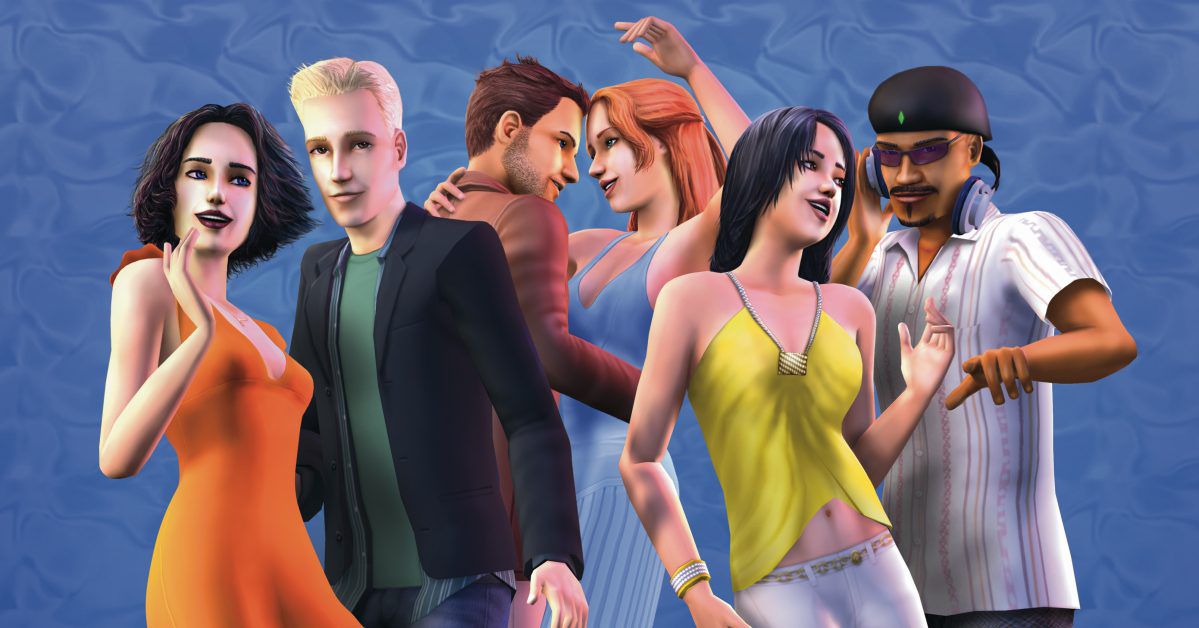
For a game that’s going on 18 years old this September, The Sims 2 is surprisingly popular on TikTok. A small, but passionate collection of fans has been making videos using the old game, drawing on nostalgia for the classic. SimsTok is focused on the new games and provides tips, but there are still many SimsTok fans who love older titles. The #sims2 and #thesim2 tags on TikTok have nearly 200 million views, even as the game becomes harder and harder to play on modern consoles.
Nostalgic SimsTok isn’t just focused on Sims 2: Comparisons among the four games are common, and hardcore Sims fans usually have their preferred game, the one that they will bat for and swear is the best. Danielle, the user behind daniellebuilds, primarily makes Sims 4 videos, but on a lark decided to post a comparison between various Sims game generations — and was completely surprised by the fervor of the reactions.
” In my personal time, I would play [The Sims 2] however I wouldn’t post about it because I wasn’t sure if anyone would be interested,” she stated. “Because I didn’t know people grew up playing it like I did. So I posted a couple videos, and they blew up and I was like, oh. That’s why I kept posting them.”
Danielle said she now regularly sees people come out to defend their Sims game of choice in the comments of her videos. Others post their own TikToks defending their favorites. The division is usually based on what game they grew up playing. The first Sims came out in 2000, the Sims 2 in 2004, and the Sims 3 in 2009, so there are some pretty clear generational markers. To Danielle, whose first Sims game was The Sims 2, there’s just something about that game that the new ones can’t quite capture.
” The Sims [in The Sims 2] they are so very different but also in such a positive way. She explained that she feels like each Sim has a personality. “With The Sims 4 you can make different Sims, but they all just feel the same to me.”
This is a natural evolution for the Sims 2 fandom
Image: Maxis / Electronic Arts
Danielle’s Sims 2 videos are often comparisons between the games, or TikToks that highlight specific gameplay elements unique to that generation of Sims. But juxtaposing the old game with the new ones isn’t the only way that Sims 2 fans celebrate their interests on TikTok.
One of the biggest Sims 2 creators on TikTok, pinokokosha, creates wordless, ambient videos with little to no accompanying text. Instead, they show clips of gameplay which weave together into a simple minute-long story. They feel a lot like short, experimental films. In one, an old couple spends some time in their idyllic home together, till the old man passes away and the woman sleeps alone in the empty bed. In another, a lone vampire Sim wakes up at night to go to his diner job and adopts a stray dog he finds on the street.
Commenters describe her videos as “Sims ASMR” and “nostalgia hits.” They are soothing and hit on iconic parts of Sims 2 gameplay that have yet to be replicated in subsequent games. In particular, they highlight minute character interactions, like couples sleeping side-by-side shifting to spoon each other in the middle of the night, toddlers sneaking out of their cribs to splash around in the toilet, and Sims awkwardly bumping noses before a sweet kiss — all little details that colored The Sims 2 and made it feel so vibrant.
Storytelling has always been a core part of the Sims fandom, but even more so with The Sims 2. The game inspired a culture of sharing original content and fanfiction via the official Sims 2 website, independent forums and blogging sites, and YouTube. Some of these stories focused on original content, but one particular hallmark of The Sims 2 was the premade characters. Every Sims game comes with them, but The Sims 2 ones have an iconic status within the fandom. Their distinct personalities, as well as the fun interconnected lore that Maxis wove into the game, made them memorable to fans.
User User omgzephyr often creates videos about premade characters. These videos are a mixture of narrative-driven videos as well as funnier TikTok riffs. Casanova Don Lothario is a frequent feature of omgzephyr’s videos, usually as the butt of the joke, but other staples of The Sims 2‘s large cast also come into play. Others bring a more modern internet touch to the Sims 2 premades, making memes using popular TikTok audios or even cosplaying as them.
The lore is deep as the different games have interconnected. Since the beginning, it has been a part of Sims. The Sims 2 characters often pop up as premade families in The Sims 4, either as downloads or in the game themselves, passing their legacy to new fans. Some TikTok creators, like bellagothstan (who’s on hiatus at the time of writing), do Wiki-style deep dives into the intricacies of The Sims 2 lore.
And then, some try to simply capture the experience of playing The Sims 2. Rather than sharing factual comparisons or “things I miss about The Sims 2,” they recreate the experience with popular audios. The Sims 2 is still the only game in the series to feature a special event camera, which played an in-game cinematic for big moments in Sims’ lives — including the first time a Sim “WooHoo’d” with another. The scene is over-the-top comical and pretty PG-13, but that didn’t stop players from being mortified when their parents walked in.
Using The Sims 2 to make music videos was also a particular hallmark of the fanbase. Sims fans still make music videos using the game, but in the days before YouTube was full of polished creators and emo music reigned supreme, there was a certain scrappy early-web earnestness to the old videos. Omgzephyr even posted a video recreating the experience.
In the comments, many fans weigh in about their faves, and wish that they could play the game too. TikTok offers a small window into the time when Sims 2 was easily accessible, with a fandom keeping up with it in real time.
It’s not that easy to play The Sims 2 in 2022
Image: Maxis / Electronic Arts
Unfortunately, each generation of the Sims becomes harder and harder to play. One, the legal copies of Sims are hard to come by. EA ran a promo back in 2014, where you could redeem the full Sims 2 Ultimate collection on Origin by proving you had a physical copy of the game somewhere, but the promotion officially ended in 2018. You can’t use the promo code or an older copy to redeem the full [******************************************************************************************************************************************************] Ultimate. However, you must prove that you have a physical copy. The promotion officially ended in [************************************************************************************************************************************************************************************************************************************************************************************************
Running The Sims 2 on a new computer often means downloading mods and finagling with the game’s settings in order to get rid of black boxes and glitching graphics. Sometimes, that even means going into internal files and tweaking the code. And sometimes, even that’s not enough.
“Still, lately, my game will crash in the middle of playing,” Danielle said, after recounting the hoops she went through to fix a graphical glitch. “And I’m like, of course I forgot to save.”
But the sheer persistence of The Sims 2 fans isn’t anything new. When The Sims 3 came out, hardcore Sims 2 fans still stuck by their game on LiveJournal and Tumblr, even as the game became harder to find and play. There may not be as many fan creators for the game as there once were, but they’re still there — converting assets in The Sims 4 to The Sims 2, posting fanart, and yes, making TikToks.
The rarity of the game also attracts a nostalgic audience who can’t play it on their own. Many comments on Sims 2-related TikToks are full of people declaring that they’ve been inspired to try and play the game again. And if they can’t get their hands on the game, or can’t get it to run properly, there are certainly many in the comments willing to offer a helping hand.
“Please never stop doing these!” reads a comment on one of pinokokoshka’s videos. “You made me play The Sims 2 again!”
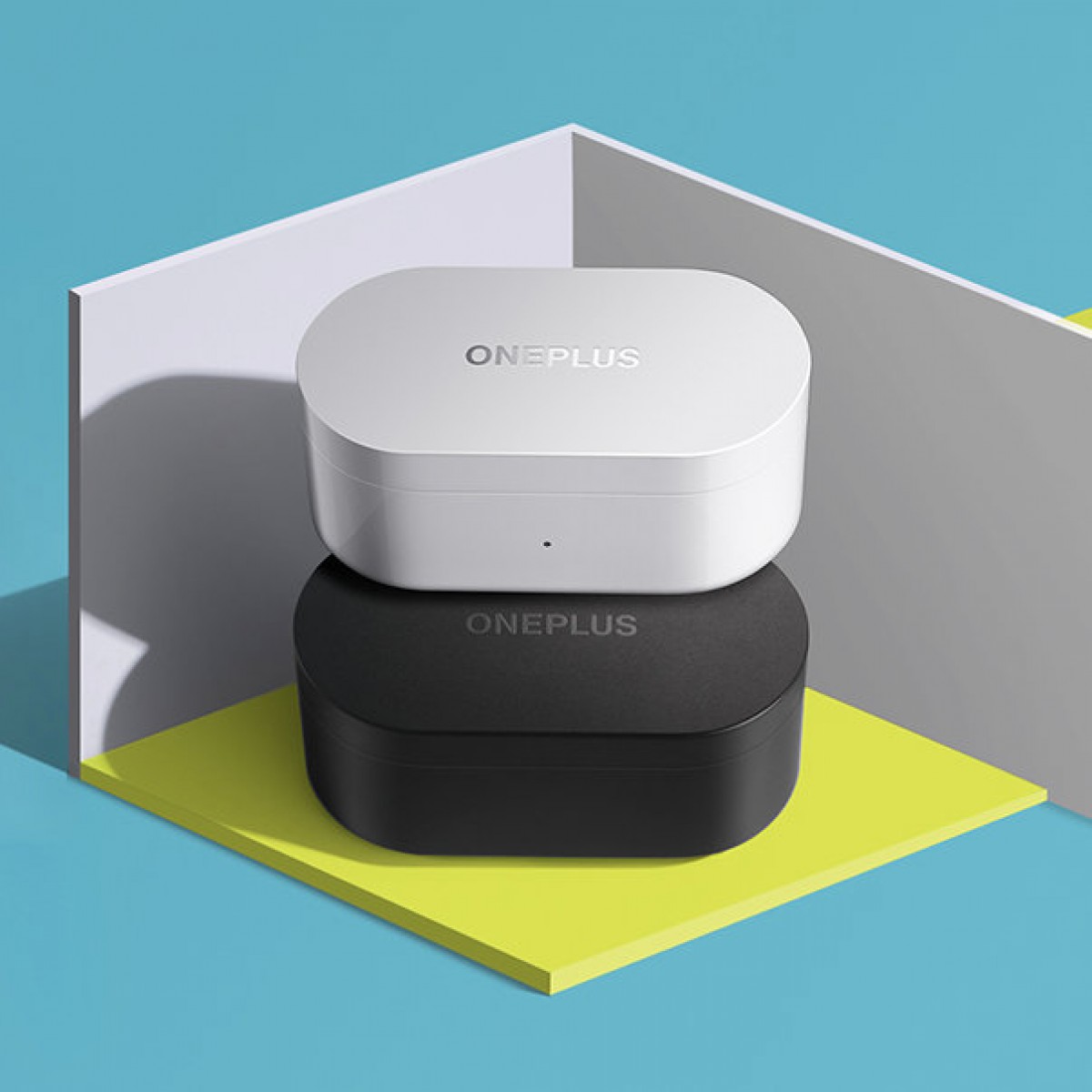
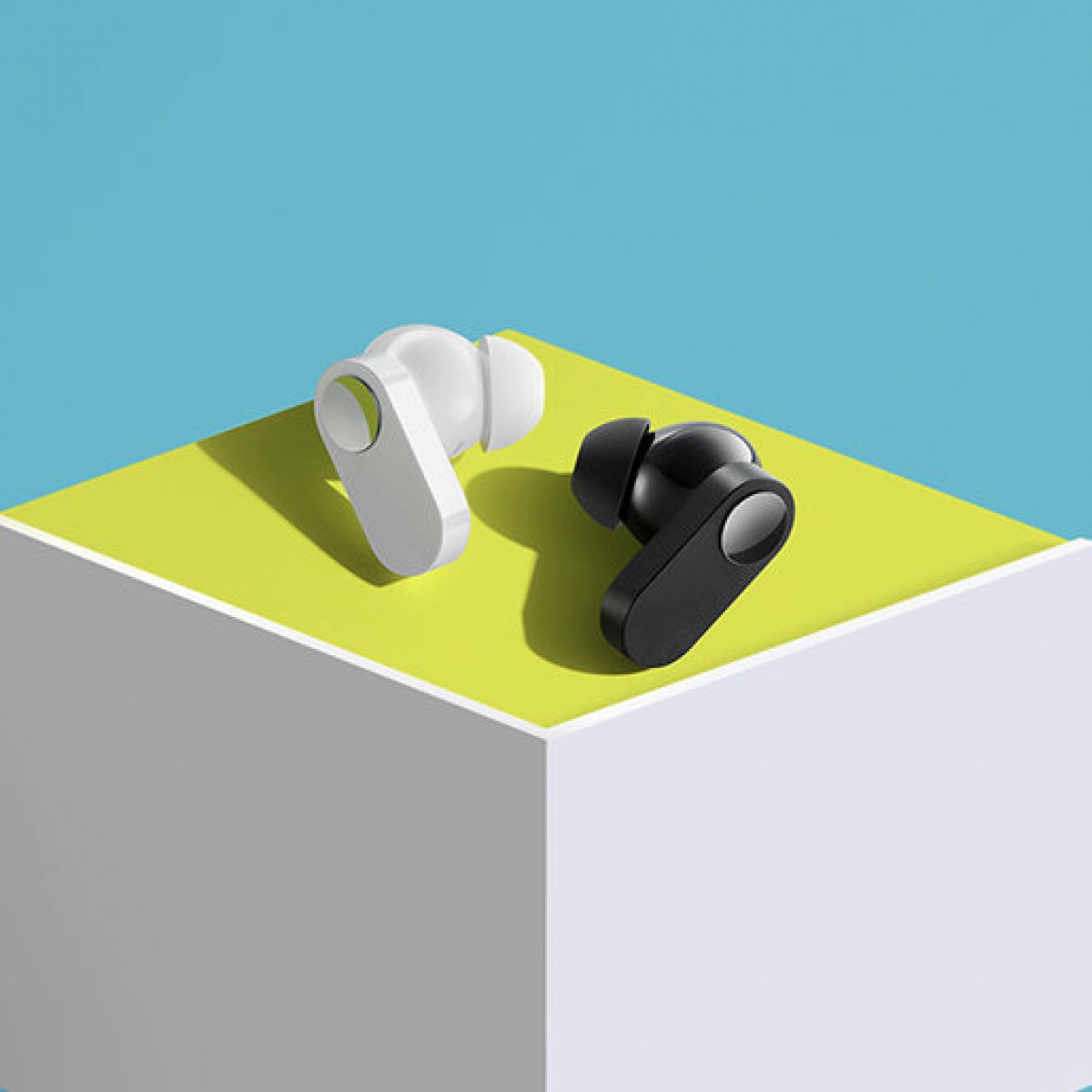
OnePlus announced today that the OnePlus Nord Buds will be launched in India. They will be launched alongside the OnePlus 10R 5G and the OnePlus Nord CE 2 Lite 5G smartphones at an online event that will take place on April 28, 19:00 IST.
The OnePlus Nord Buds are a pair of truly wireless earbuds. Keeping with the Nord branding, we expect them to be the more affordable option in OnePlus’ lineup, which includes other TWS products such as the OnePlus Buds Pro and the recently launched OnePlus Buds Z2.
However, while OnePlus has not provided any details about the product so far, the rumor mill has been buzzing about it for a while now. The things we know will allegedly include 12. 4mm drivers, IP55 rating, 30 hour battery life (including the case), 94ms latency, and Bluetooth 5.2. The earbuds will also be available in two colors, as seen above.
We will continue to cover the product, and even a formal review as we approach the launch.







:format(webp):no_upscale()/cdn.vox-cdn.com/uploads/chorus_asset/file/11596749/Webp.net_resizeimage__6_.jpg)
:format(webp):no_upscale()/cdn.vox-cdn.com/assets/4763672/690px-TS2_Banner.jpg)